Saturday, May 27, 2017

Is it worth purchasing a MacBook Pro 2017?

Is it worth purchasing a MacBook Pro?

I owned a Windows laptop which was about 10 months old when I decided to buy a MacBook Pro. It was about 1.2 pounds lighter than my Win laptop, 2x more powerful and 3x more expensive. I had to take a call, is it really worth investing? I did my research before buying it, I will try to go over the qualities I thought are necessary in a laptop.

  1. Speed
I am combining a lot of ‘speeds’ under this, the processor power, SSD read-write, boot times, apps loading, excel-word processing etc. I did a quick comparison between a friend’s MacBook Pro and my old windows laptop. I cannot even compare the two, mainly due to different CPUs and drives, but MacBook Pro was going to win anyway due to hardware edge it had.Gihosoft iPhone Data Recovery https://goo.gl/LF7B13 Gihosoft iPhone Data Recovery is a professional iPhone Data Recovery software to get back all your lost text message, photo, video, call history, note, contact and more from iPhone/iPad/iPod Touch. It offers a full solution to recover your lost data in different tough situations. Besides recovering data directly from iPhone, iPad and iPod touch, it also allows you to recover data from iCloud and iTunes backup files. https://www.gihosoft.com/iphone-data-recovery-free.html

2. Reliability

My old Lenovo laptop had a flimsy construction overall. The hinges would squeak, the keyboard would make weird noises, CPU fans would start screaming with a bit of number crunching, the screen would flicker for no reason. And mother of all evils, unexpected restarts. I hate it when it just crashes in the middle of nothing. I tried on a library MacBook Pro for varying intensities of loads. It passed with flying colors. It is needless to say that MacBook Pro has the best in class build quality. I haven’t had a single issue with the hinges so far.

3. Screen

Let’s just admit it, let aside the newer 4K displays, MacBook Pro’s retina display hands down beats every possible display out there. Color reproduction is accurate. You don’t feel the images to be washed out or over-saturated. You can open it any time and you will still feel the freshness in the colors displayed. I like it. Some people like the newer 4K displays. I haven’t had a chance to get my hands on one of those yet, so I can’t compare how it stacks against those.

4. It just works

MacBook Pro just works! It seems to have got the right balance of everything. It will never scream. It will never die on you. It will not display weird errors. It will not crash. You don’t have to worry about installing the right ‘DirectX’ or the right ‘Visual C++ Runtime Environment’. You don’t have to find out which anti-virus is the best and pay for it every year. It just works!

5. Battery

10 hours. That’s what I have been running my 2014 MBP 13 every day on a single charge. My oldie would die on me in 2 hours. I have never taken my charger with me to school. It saves the amount of weight I carry around in school. It reduces the number of things I take in my bag. I can fit everything in my bag easily.Win Piriform CCleaner Professional Giveaway (10 x Full Licenses) support by GroupBuy SEO Tools https://www.piriform.com/ccleaner Mention this giveaway part on your blog, and send us link at doogeetop@gmail.com, you can a chance get free Piriform CCleaner Professional V5.30 license.

Saturday, May 20, 2017

Set the DP without Cropping the Image

Set the DP without Cropping the Image
  • Step 1: Install SquireDroid in your device from Google Play.
  • Step 2: once the installation is complete, the app’s icon will be found on the homescreen & app menu of your device. Click on the app & run it. There you will find menus like “Pick A Photo”, “Take A Photo” & “Settings” etc.
  • Step 3: Tap on “Pick A Photo” & from there the full menu will appear & you can select the desired picture that you wish to make your DP without having it cropped.
  • Step 4: The app will instantly resize the picture & crop instantly. & the best thing about it is that, without losing anything from the picture, the full picture could be used as the DP. The picture will not be harmed in any way I mean it won’t affect the picture.
  • Step 5: You can also save the quality of the image while saving the picture, unlike in some apps the quality becomes bad which looks extremely ugly.
  • Step 6: Now go to the gallery of your phone. Choose the picture & use it as your Whatsapp DP without losing size.
However there is another way to do it. If your picture size is 1:1 ratio, it can directly be used as a Whatsapp DP without losing size.

So, you see the steps are very easy & in only few clicks you can actually set up your DP without losing any size. For some people changing DP matters the most, as it becomes a part of their identity. People who are online could see the DP & with that they know who is who.

Whatsapp is fun & interesting. It’s the quickest way to reach our loved ones. It is one of the most interesting social networking in the world today & undoubtedly among the best.

With that said, I hope this article was helpful for you. I appreciate your visit. Thanks for being here.
Special Offer:
A chance to win CleanMyMac 3 free Licenses! Bravo!
offering 10 copies of CleanMyMac3
Win CleanMyMac 3 free License Professional Giveaway (10 x Full Licenses) support by GroupBuy SEO Tools
Mention this giveaway part on your blog, and send us link at doogeetop@gmail.com, you have a chance to get CleanMyMac 3 free Licenses!
To participate: repost this giveaway on your blog,tumblr,wordpress or blogspot.

Friday, May 5, 2017

Are You a Small Business Owner Looking to Boost Visibility Online?

Have a comprehensive site audit

In simple terms, a site audit assesses the overall health and well-being of your website. An audit will let you know how easily your site can be found by a potential user, what keywords are missing or not ranking, and how you can optimize your website for better future results. During your site audit, make sure to evaluate your site and URL structure, inbound links, titles, and onsite content. Once these factors are in tiptop shape, you will be able to build upon your site a a whole.

Social media

One of Google’s main goals is to find shareable content on your page; up-to-date video posts and blogs all add credibility to a website. It is also important to connect your social media profiles to your website not only for the ease of your clients, but to rank well within local SEO searches. Related:GroupBuy SEO Tools
Chances are if you Google the names of your competitors, you will find their social media profiles high among the first page of results. Search engines try to pinpoint as much information on these businesses as they can, so having a strong social media presence can improve your search result standings a couple notches.

Mobile optimization

Everyone has mobile devices nowadays, so it is more important than ever to ensure your website content is optimized for mobile use. More clients than ever will be searching for companies and making purchases online, so if your website is not optimized for mobile, you will undoubtedly lose potential customers.
While SEO can seem intimidating for a beginner, simply following these easy tips can help boost your credibility in the eyes of Google. For the best results, contact a professional search marketing firm to help. Related:GroupBuy SEO Tools

Monday, February 1, 2016

Elephone W2 Unboxing

Wearables are all over the market, but the Elephone W2 is a little different as it uses traditional watch movements with a few smart features that sync with your smartwatch or tablet.

Elephone W2 first impressions

elephone w2 watch
The W2 connects to your device (with Android or iOS) via Bluetooth and is set up with the dedicated Elephone W2 application (available on Google Play).
Like similar wearables, such as the Mi Band, the main features of the Elephone W2 are to simply count steps and monitor your sleep, but there are a few additional features.
The fact that it has Swiss watch movements means the W2 can actually display the time, a huge advantage over the Mi Band. The Elephone wearable also offers remote camera control, and a battery life of up to 3 months.elephone w2 watch
Included in the Elephone W2 packaging is the watch, a strap, screwdriver, and 3 batteries (one already installed) plus there’s a quickstart guide to get you up and running.
elephone w2 watch
The straps simply clip in to place, and the screwdriver is to take off the rear and replace the battery. With 3 included batteries you have 9 months of use without needing to buy another, just be careful when you unscrew the rear the screws are very small and easy to loose.
elephone w2 watch
Three controls on the W2’s stainless steel body include a power switch for Bluetooth (the top button). A dial to set the time (in the middle) and the final button is for changing modes and seeing your exercise progress through the day.
elephone w2 watch
LED lights on the face have blue, green and red colours. Blue being sleep mode Green means the watch is on or is synching data a red means low battery.
elephone w2 watch
Although the metal body feels heavy and looks bulky in the hand it looks fine once the strap is attached, and on your wrist is is really comfortable.
The Elephone developed app is also surprisingly good too and setting the watch up on my OnePlus X was super straightforward.
elephone w2 watch
I’ll be wearing the Elephone W2 watch for the next few days so keep an eye out for the full review coming very soon.

Elephone W2 Gallery

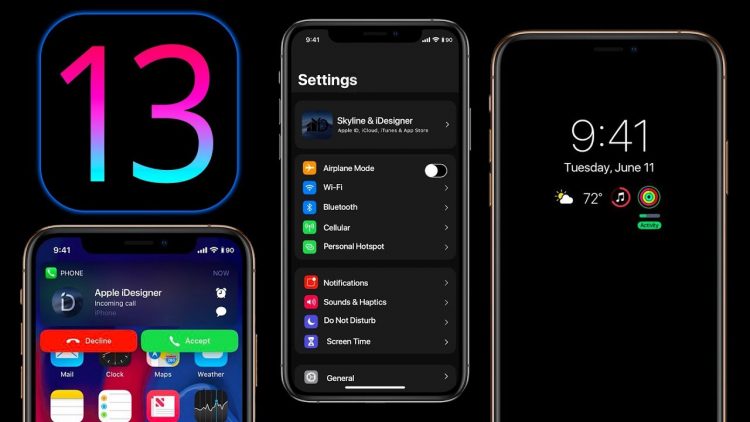
iOS 13 To Introduce Dark Mode

Image Credit: ilounge.com Dark mode has been the most-wanted feature on mobile phones and Google and Samsung are making sure of that. While ...